
In today’s fast-paced world, chatting online has become a big part of how we connect with others—whether it’s for work, catching up with friends, or just having a laugh. Chat software plays a crucial role in this digital communication revolution, making it easier than ever to stay in touch with people near and far. From simple text messaging to video chats and file sharing, these tools have transformed the way we interact, making conversations more accessible and enjoyable. Let’s dive into what chat software is all about, and why it’s such an essential part of our daily lives.
Understanding Chat Software: What Is It?
Chat software is a digital platform designed to facilitate real-time communication between users. It can come in various forms, from simple messaging apps to complex customer service solutions. At its core, chat software allows users to send and receive messages instantly, making it an essential tool in today’s fast-paced digital environment. Whether it’s for personal communication with friends and family or for professional interactions within a team or with clients, chat software plays a pivotal role in how we connect.
Initially, chat software was primarily text-based, allowing users to type out messages and send them back and forth. However, advancements in technology have expanded this definition significantly. Now, many chat applications also support multimedia messaging, enabling users to send images, videos, and even voice messages. Some platforms have integrated features like video calls and screen sharing, turning a simple chat app into a comprehensive communication suite.
The importance of chat software in the workplace cannot be overstated. With remote work becoming a norm, tools like Slack, Microsoft Teams, and Discord have surged in popularity. These platforms not only allow for text communication but also provide functionalities such as file sharing, integration with other software tools, and branding options. They help teams collaborate effectively, regardless of their physical location.
Moreover, chat software is also essential in customer service. Chatbots and live chat functionalities on websites allow businesses to interact with customers in real-time, answering queries and resolving issues more efficiently. This immediate accessibility can enhance customer satisfaction and retention, showcasing just how integral chat software is in bridging communication gaps.
Types of Chat Software: Which One Should You Choose?
When it comes to selecting chat software, it’s important to understand the different types available and which one suits your specific needs. Generally, chat software can be divided into several categories: team collaboration tools, customer service chat, and social messaging apps.
Team collaboration tools, such as Slack and Microsoft Teams, are designed for internal use within organizations. They focus on facilitating communication among team members, allowing for project management, file sharing, and even virtual meetings. These tools often include features that enhance productivity, such as task assignments and integrations with other work applications, hence making them ideal for businesses.
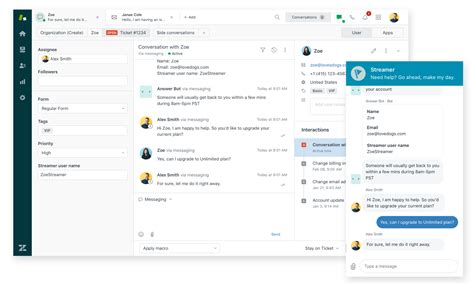
On the other hand, customer service chat software complements your business’s online presence. Tools like Zendesk or Intercom provide platforms where businesses can engage with their customers, handle queries, and solve problems in real time. These platforms can also include features like automated responses through chatbots, which can significantly cut down response times and improve efficiency.
Then there are social messaging apps like WhatsApp, Facebook Messenger, and Telegram, which cater more to personal communication. While primarily used by individuals for chatting with friends and family, these apps can also be adapted for business use, allowing companies to connect with their customers in a casual and familiar setting. Their widespread popularity might make them a compelling choice for brands looking to reach their audience more informally.
The Benefits of Using Chat Software for Businesses
Implementing chat software within a business framework offers numerous benefits, making it an essential tool for modern enterprises. One of the primary advantages is improved communication. With real-time messaging, teams can easily discuss ideas, share files, and communicate decisions without the delays associated with traditional emails or memos. This instantaneous communication can significantly enhance team productivity and foster a collaborative environment.
Moreover, chat software helps keep track of conversations and can serve as documentation for important discussions and decisions. Many platforms allow users to search for past messages, making it easier to reference previous conversations without digging through emails. This feature can prove invaluable during projects requiring cross-functional collaboration, where keeping everyone on the same page is crucial.
Another benefit is enhanced customer engagement. Businesses that utilize live chat on their websites can interact with customers as they browse, providing immediate support and increasing the chances of conversion. Fast, responsive communication can make all the difference in customer satisfaction, leading to repeat business and positive reviews.
Finally, chat software can also improve employee morale. By fostering a more connected and communicative workplace, employees are likely to feel more involved and valued. Features like emoticons and threaded conversations can add a fun element to discussions, breaking the ice and creating a vibrant company culture. In this way, incorporating chat software can not only boost productivity but also contribute to a more enjoyable work environment.
Key Features to Look for in Chat Software
When selecting chat software for personal use or for your business, certain features can greatly enhance usability and functionality. First and foremost, user-friendliness is essential. A platform that is intuitive and straightforward allows users to adopt the software quickly without extensive training or support.
Next, look for software that supports multiple forms of communication. The ability to send text, images, videos, and audio messages provides versatility. Additionally, features like voice and video calls can enhance remote collaboration when face-to-face interaction isn’t possible.
Integration capabilities with other tools are another key aspect to consider. Many businesses rely on various applications, from project management tools to CRM systems. If your chat software can seamlessly integrate with these other platforms, it can streamline workflows and improve overall productivity.
Moreover, consider security features. With the increasing concerns related to data privacy, it’s crucial to choose software that prioritizes security. End-to-end encryption helps ensure that all communications can only be read by the intended recipients, making it a fundamental feature for any business handling sensitive information.
Lastly, look for customization options. The ability to tailor the software to fit your company’s branding and specific needs can enhance user experience and make the platform more engaging for employees. Having a chat software that is both functional and visually aligned with your brand can leave a lasting impression on clients as well.
How Chat Software Enhances Remote Work
The rise of remote work has reshaped how we view communication in the workplace. With teams scattered around the globe, chat software has become a cornerstone of remote collaboration. These tools bridge the gap between distant team members, ensuring that communication remains fluid and constant regardless of location.
One major way chat software enhances remote work is by facilitating informal communication. In traditional office settings, spontaneous conversations often happen in hallways or break rooms, fostering a sense of community. Chat software replicates this by allowing team members to have casual discussions in dedicated channels, where they can share ideas and build relationships without the need for formal meetings.
Additionally, it helps in keeping everyone informed and aligned. Teams can create specific channels for projects, topics, or departments, enabling members to share progress, updates, and crucial information in real-time. This way, everyone stays in the loop, reducing the chances of miscommunication and misunderstandings that can occur when working from various locations.
Moreover, chat software often comes equipped with project management features that allow teams to assign tasks, set deadlines, and track progress directly within the platform. This ease of access to information enhances accountability, ensuring that everyone is aware of their responsibilities and deadlines without the need for back-and-forth emails.
Finally, chat software can facilitate team bonding, which is particularly important in remote work scenarios where employees might feel isolated. Features like polls, game integrations, and interactive channels can promote camaraderie among team members, fostering a positive work culture even when working from home.
Integrating Chat Software with Your Current Tools
When implementing chat software, one of the most challenging aspects can be integrating it with your existing tools. However, the right integrations can significantly enhance productivity and create a seamless workflow. Most chat software solutions offer extensive integration capabilities, allowing them to connect with various applications and services.
First, start by assessing your current toolset. Identify which applications are essential to your daily operations, such as project management tools, calendar applications, and customer relationship management (CRM) systems. Understanding your priorities allows you to seek chat software that integrates well with those systems.
Once you’ve determined your needs, explore the integration options offered by different chat software. Popular tools like Slack and Microsoft Teams typically provide native integrations with countless applications, making it easier to customize your workspace according to your business requirements. Additionally, many platforms have APIs available for custom integrations, allowing your IT team to connect chat software with proprietary solutions.
Regularly utilizing integrated tools can streamline workflows significantly. For example, integrating your chat software with a project management tool allows team members to discuss ongoing tasks right beside the relevant project information. This reduces the time spent switching between applications, making it easier to access the necessary details without losing the context of the conversation.
Another critical aspect is training staff about these integrations. When introducing a new chat platform, taking the time to educate users on how to effectively use integrations will greatly enhance overall productivity. Provide resources or training sessions that showcase how these tools work together, ensuring that every team member can make the most out of the chat software and its integrations.
Security and Privacy Considerations for Chat Software
As businesses increasingly turn to chat software for communication, ensuring the security and privacy of those interactions is paramount. With sensitive information being shared, organizations must consider the protections available within the platforms they choose. First and foremost, look for chat software that offers end-to-end encryption, meaning that data is encrypted when it leaves the sender and can only be decrypted by the intended receiver.
Furthermore, data retention policies should be clear. Some chat applications retain messages for extended periods, while others allow you to set retention policies according to your company’s needs. Understanding how long your messages will be stored and your capabilities for archiving can help you make informed decisions about compliance and data management.
Two-factor authentication (2FA) is also a vital feature you should consider when choosing chat software. This additional layer of security can protect access to your account, making it more difficult for unauthorized users to gain entry. Ensuring all team members have 2FA enabled can significantly reduce the risk of account compromise caused by phishing attacks or weak passwords.
Finally, be wary of third-party integrations. While they enhance functionality, they can introduce security vulnerabilities if not adequately vetted. It’s wise to assess each integration’s security measures before allowing them access to your chat platform. Establishing a framework for reviewing third-party applications will help mitigate the risk of unapproved software compromising your security.
Best Chat Software Options on the Market Today
Choosing the best chat software depends heavily on your specific use case, but several options stand out in the current market. Slack is known for its user-friendly design and robust integration capabilities, making it a top choice for team collaboration. Its channels, direct messages, and bot functionalities cater perfectly to organizations looking to foster teamwork.
Microsoft Teams is another excellent option, especially for businesses already using Microsoft 365. It provides seamless integration with other Microsoft apps, ensuring that users can access everything they need without leaving the platform. The video conferencing capabilities also make it ideal for organizations requiring frequent virtual meetings.
For customer service solutions, Intercom is a leading choice. It offers live chat and chatbot capabilities, ensuring real-time communication with customers while also allowing businesses to automate responses for common inquiries. This can drastically reduce response times and improve user experience on your website.
On the more casual side, applications like Discord allow for fluid communication with friends or community members. Although initially developed for gamers, its versatility and range of features have made it a popular choice for various groups, from study groups to hobbyist clubs. It combines voice, video, and text chat in ways that foster engagement and interactivity.
Ultimately, the ideal chat software will depend on the size of your team, the nature of your business, and your specific needs. Reviewing the available options and considering their features, pricing, and compatibility with your existing systems can help you make the best choice for your organization.
Understanding Chat Software: Features and Benefits
1. What is Chat Software?
Chat software is a digital tool that facilitates real-time communication between users through text, voice, or video, usually over the internet. It allows individuals and teams to communicate swiftly and effectively, enhancing collaboration and productivity. The evolution of chat software began with simple text messaging systems and has now expanded to encompass a plethora of features including group chats, multimedia sharing, and integration with other collaborative tools. This transformation has played a pivotal role in how businesses, organizations, and individuals communicate, offering a variety of platforms to suit different needs and preferences. Common use cases for chat software include customer support, team collaboration, and social networking.
| Common Use Cases |
|---|
| Customer Support |
| Team Collaboration |
| Social Networking |
| Remote Work Communication |
2. Key Features of Chat Software
When considering chat software, it’s important to understand the key features that can increase its utility for users. Features to look out for include:
- Instant Messaging: The primary function allowing users to send instant text messages.
- Voice and Video Calls: Many chat platforms support audio and video calls for enhanced communication.
- File Sharing: The ability to share documents and multimedia makes collaboration seamless.
- Integration with Third-Party Apps: Software that works well with other productivity tools boosts efficiency.
- Secure Communication: With increasing cyber threats, security features have become paramount.
Understanding these features can help users choose the right chat software that meets their specific needs, whether for personal use or within a corporate environment.
3. Benefits of Using Chat Software for Businesses
For businesses, implementing chat software can yield numerous benefits that contribute to improved operational efficiency and team dynamics. Primarily, chat software allows instant communication, which can speed up decision-making processes. This immediacy is invaluable, especially in fast-paced environments where time is critical. Additionally, many chat platforms provide centralized communication, reducing reliance on emails and making it easier to keep track of conversations.
Moreover, chat software often includes features for project management, facilitating collaboration and keeping everyone on the same page. Enhanced team cohesion is also a benefit of using chat software, as it allows for casual conversations that can strengthen relationships and foster a healthy work culture. Utilizing analytics that some chat platforms offer can provide insights into communication trends and areas for improvement in workflow.
4. Top Chat Software in the Market
The market is saturated with chat software options, but a few stand out due to their features, ease of use, and customer satisfaction. Some top contenders include:
- Slack: Ideal for teams looking for advanced collaboration tools.
- Microsoft Teams: A comprehensive tool for businesses already integrated into the Microsoft ecosystem.
- Zoom: Predominantly recognized for video conferencing, it also offers chat functionalities.
- WhatsApp: Popular for personal communication with a business-friendly version.
Choosing the right platform often depends on the specific needs of the organization, including budget, desired features, and integration capabilities.
5. Frequently Asked Questions (FAQ)
What is the difference between instant messaging and chat software?
Instant messaging refers to a real-time method of communication between two or more people through text, whereas chat software often encompasses additional features such as voice and video calling, file sharing, and more.
Can chat software improve team productivity?
Yes, by facilitating quick and efficient communication, chat software can significantly enhance team productivity, ensuring that information is shared and decisions are made promptly.
Is chat software secure?
Most chat software includes security features like end-to-end encryption or secure servers to protect user data, but it’s essential to choose platforms known for their security measures.
Can I use chat software on my mobile device?
Most modern chat software platforms offer mobile apps, allowing users to communicate on the go, thereby increasing accessibility and flexibility.
What platforms are best for remote teams?
Platforms that provide video conferencing capabilities alongside chat features, like Microsoft Teams or Zoom, are often the best for remote teams. They support both communication and collaboration effectively.
How is chat software beneficial for customer support?
Chat software can facilitate real-time interactions with customers, enabling businesses to respond quickly to inquiries, resolve issues efficiently, and ultimately improve customer satisfaction.
Are there free options available?
Yes, many chat software platforms offer free versions with limited features, making them accessible for individuals or small businesses on a budget.
Do I need technical skills to use chat software?
No, most chat software is designed to be user-friendly, requiring minimal technical skills to get started.
Can chat software integrate with other tools?
Yes, many chat platforms support integration with third-party applications like project management tools, enhancing their functionality and utility for users.
What should I consider when choosing a chat software?
Consider factors such as user-friendliness, security features, integration capabilities, and cost when selecting the best chat software for your needs.
Is there a limit to the number of users in chat software?
This varies by platform; while some have strict limits, others cater to larger groups and teams efficiently. Always check the specifications ahead of time.
Can chat software help reduce email volume?
Yes, by providing an alternative for quick communications, chat software can help reduce the number of emails exchanged, streamlining communication.
What industries benefit most from chat software?
Industries like customer service, tech, and creative sectors have significantly benefitted from chat software due to their reliance on collaboration and real-time communication.
How does chat software support team collaboration?
Chat software facilitates group chats and direct messaging, enabling teams to communicate instantly, share ideas, and solve problems more collaboratively.
Can chat software support large companies?
Many chat software solutions are specifically designed to accommodate large organizations, providing features to support extensive team communication and management.
Are there chat software options suitable for personal use?
Definitely! Various chat software platforms, like WhatsApp or Telegram, cater to personal use, offering features ideal for casual chatting and connecting with friends.
Thanks for Stopping By!
We hope you found this dive into chat software as interesting as we did! It’s amazing how these tools can help us connect and communicate in our busy lives. Thanks for hanging out with us and reading—we really appreciate it! Don’t be a stranger; swing by again later for more insights and updates. Until next time, happy chatting!







